CASE STUDY / 02 MYPASSWORDS · ANDROID
Your vault.
On your device.
Passwords are personal. MyPasswords brings them into a local Android vault with biometric access, a Hebrew interface and everyday tools for finding, organizing and recovering credentials.
- Product
- Local password vault
- Platform
- Native Android
- Interface
- Jetpack Compose · Hebrew RTL
- Storage
- Room · SQLCipher · AES-GCM
THE CHALLENGE
Keep everyday access simple.
Make its boundaries explicit.
Finding a login should be straightforward. Underneath that familiar list, a vault has harder questions to answer: when is a session open, what happens when the app leaves the foreground, and how can a password change be reversed?
MyPasswords addresses those questions with a central session owner, encrypted local storage and transactional history. The Compose interface adds search, categories, favorites, password health checks and a recycle bin.
The Android app works locally without an Internet permission. This case study describes code and tradeoffs in the repository; it does not claim an independent security audit or measured production outcomes.
TOUCH THE EXPERIENCE
Open. Find.
Make it yours.
Explore a recreation of the app’s Hebrew interface, using its navy surfaces, teal accents and right-to-left layout.
- Open the demoStep through a clearly labeled simulation of the unlock flow.
- Find an accountSearch sample records, filter categories or view favorites.
- Manage the listAdd a preset account, reveal a sample password, or delete and restore a record.
This browser demo uses fictional accounts held in memory. It does not run Android, authenticate biometrics or encrypt stored passwords. Refresh or reset to start again. The phone keeps the same dimensions as you change screens.
ברוך הבא למאגר הסיסמאות שלך
גישה נוחה לחשבונות החשובים לך, בממשק שנשאר קרוב אליך.
האפליקציה משתמשת באימות ביומטרי
באפליקציה, האחסון נמצא במכשיר
הדגמת ממשק עם נתונים פיקטיביים בלבד.
גישה לכספת
ב־MyPasswords, זהו השלב שבו מופעל האימות הביומטרי של Android.
כאן זו סימולציה בלבד. אין סריקת טביעת אצבע או בדיקת זהות.
הכל במקום בטוח אחד
גישה מהירה לחשבונות החשובים לך
3 פריטים בתצוגהלא נמצאו רשומות. אפשר לשנות את החיפוש או את הסינון.
פרטי חשבון פיקטיביים להדגמה
- שם משתמש
- סיסמה לדוגמה
- ••••••••••••
הוספת פרטי התחברות חדשים
השדות מוכנים מראש. אין להזין מידע אמיתי.
סל מחזור
אפשר לשחזר את הרשומות שמחקת במהלך ההדגמה.
סל המחזור ריק.
UI simulation · Sample accounts only · No biometric authentication or encrypted storage in this demo
BEHIND THE INTERFACE
Three decisions.
The reasoning behind the build.
LIFECYCLE · COROUTINES
Make locking a session boundary.
VaultSession owns the open database, the in-memory vault key and authentication state. Locking advances a session generation, revokes access and clears its owned key buffer. Operations check their session ticket so work from an earlier session can be cancelled.
What this enables
Screens and repositories share a concrete boundary for access. The Android host also locks when it leaves the foreground, except during a configuration change.
The tradeoff
Asynchronous operations must consistently respect that boundary. Clearing owned byte arrays does not guarantee that every temporary copy or JVM string has been erased.
ANDROID KEYSTORE · AES-GCM · SQLCIPHER
Treat key lifecycle as part of storage.
The app combines a SQLCipher-backed Room database with AES-GCM encryption for credential fields. Android Keystore provides an authentication-bound key for wrapping the vault key; biometric enrollment changes invalidate that Keystore key.
What this enables
Storage, field encryption and authenticated key access have separate responsibilities. The database owns a copy of its passphrase and clears that buffer when it closes.
The tradeoff
Layered encryption adds recovery and invalidation paths to maintain. Recovery must be configured in advance and works within the same installation; it is not a portable backup or cloud sync.
ROOM TRANSACTIONS · HISTORY
Make a password change an atomic operation.
The DAO archives the previous encrypted password and updates the credential in one transaction. It checks that the stored credential still matches the expected values before writing. History restoration checks ownership and archives the current password before restoring the selected version.
What this enables
A successful password update keeps its corresponding history. Separate trash and restore actions let people reverse an accidental deletion without immediately losing the record.
The tradeoff
History retains more encrypted data and needs a retention policy. The app’s 30-day trash cleanup runs when the vault or trash is opened, rather than promising deletion at an exact background deadline.
FROM THE APP
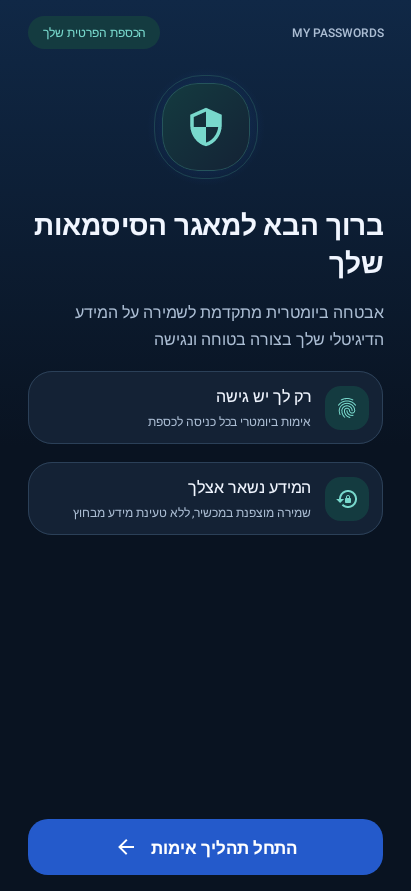
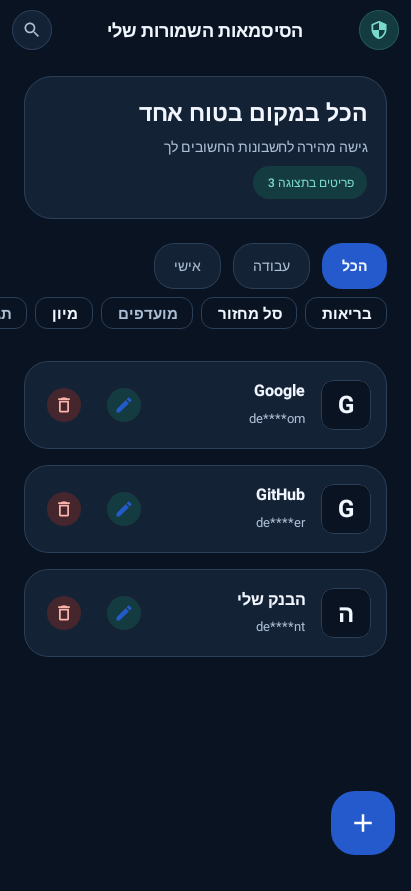
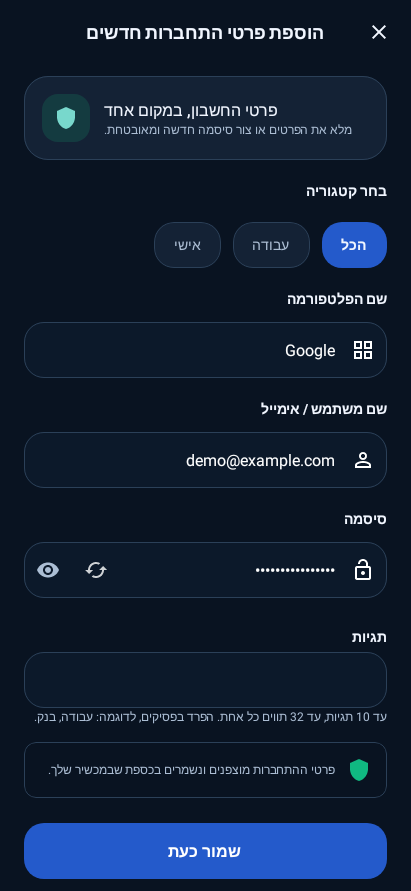
The original Compose interface.
UI renders from the Android project’s local Robolectric tests, using synthetic accounts. These show the app’s Compose screens, separate from the browser recreation above.
WHAT I WOULD VERIFY NEXT
Confidence comes
from the edge cases.
A useful next verification pass would exercise backgrounding during a write, biometric enrollment changes, and recovery after key invalidation on physical devices.
I would also review the Hebrew flows with TalkBack: finding a record, revealing a password and restoring from trash should each have a clear focus order and announcement. These are proposed verification priorities, not claims that this case study has completed a device or security audit.
Read the MyPasswords repository ↗